Welcome!
I'm Galen, your host. This digital guidebook has everything you need: how to operate the home, what to find where, and recommendations for local attractions and restaurants. Welcome to Salty Oak OKI.
Before You Arrive
Pre-Arrival Checklist
- Review this guidebook
- Save WiFi network name and password (from your arrival email sent the day of check-in. WiFi info is also posted inside the home.)
- Add this guide to your home screen: On iPhone, tap Share then 'Add to Home Screen.' On Android, tap the browser menu then 'Add to Home Screen.'
- Confirm your arrival time and communicate any delays to your host
- Check the weather forecast and tide schedule (see Weather & Beach section)
What to Pack
Standard travel basics aside, here are the property-specific items worth knowing about:
- Beach towels (not provided)
- Laundry detergent (not provided)
- Preferred morning coffee (starter K-Cups and filters are provided; bring extras or ground coffee if you'll need more)
- Additional toilet paper, paper towels, and kitchen garbage bags (a starter supply is provided)
- Insect repellent (helpful in warmer months)
- A bag of ice if hosting a larger group (the in-fridge ice maker handles everyday needs; bags are available at ice vending machines along East Oak Island Drive and at local grocery and convenience stores)
Check-In & Arriving
Check-In Times
Check-in is available from 4:00 PM to 9:00 PM. Please plan your arrival within this window.
Smart Lock Entry
Salty Oak OKI has three exterior doors with smart locks (lower front door, upper front door, and back door). All three doors use the same personalized 4-digit code, which will be sent to you within 24 hours of your check-in date.
- Entering your code: Tap the middle of the touchscreen keypad and enter your 4-digit code. A checkmark will flash when your code is accepted.
- Locking from outside: Tap the lock icon on the touchscreen to lock the door.
- Locking from inside: Use the thumbturn lever.
- Valid period: Your code will work between your check-in and check-out dates and times only.
Parking
The driveway accommodates up to 4 vehicles. A Level 2 EV charger is available if needed. Please do not park off the driveway or on the street.
Your Home
Bedrooms & Bathrooms
Primary King Suite (Main Level)
- King bed
- Walk-in closet
- Suitcase stand
- Spa bathroom with double vanities and oversized walk-in tile shower
- 55" TV
- Ceiling fan
King Suite with Workspace (Top Floor)
- King bed
- Walk-in closet
- Suitcase stand
- Workspace with desk
- En-suite bathroom with walk-in tile shower
- 55" TV
- Ceiling fan
King Suite (Top Floor)
- King bed
- Walk-in closet
- Suitcase stand
- En-suite bathroom with walk-in tile shower
- 55" TV
- Ceiling fan
Queen/Twin XL Bunk Room (Top Floor)
- Queen bed + Twin XL bunk
- Walk-in closet
- En-suite tub/shower combo
- 43" TV
- Ceiling fan
Private King Suite (Ground Level)
- King bed
- Walk-in closet
- Suitcase stand
- En-suite bathroom with walk-in tile shower
- 55" TV
- Ceiling fan
Half Bath (Main Level)
- Off the common area
- Convenient for guests using living spaces
Kitchen & Dining
The fully equipped kitchen features granite countertops, stainless steel appliances, an island with seating for 3, and a separate dining table that seats 8.
Appliances & Equipment
- Refrigerator: Side-by-side with craft ice maker and filtered water dispenser. The ice maker handles everyday needs well. For larger groups, we recommend picking up a bag of ice. Several ice vending machines are located along East Oak Island Drive, and grocery and convenience stores in the area also carry ice.
- Under-counter beverage fridge
- Electric cook top and oven
- Microwave
- Dishwasher
Coffee Maker
A combination drip/Keurig coffee maker is provided with detailed instructions:
- Single-Serve (K-Cup): Place your mug under the dispenser, insert a K-Cup pod, select the single-serve button on the right, press the K (BREW) button, and press STRONG if you prefer more flavor.
- Carafe: Lift the carafe lid, insert a paper filter, add approximately 1 tablespoon of ground coffee per cup (max 15 cups), place the carafe on the heating plate, select the carafe button on the left, select your desired number of cups (6, 8, 10, or 12), and press K (BREW).
View full kitchen inventory
Drinkware
- Coffee mugs
- Tall and short acrylic glasses
- Beach tumblers
- Stemless wine glasses
- Acrylic pitcher
Cookware & Bakeware
- Glass and metal baking dishes
- Cookie sheets
- Pizza and muffin pans
- Stainless steel pots
- Nonstick skillets
Prep Tools & Utensils
- Cutting boards and mixing bowls
- Cooling racks, colander, and trivets
- Toaster and blender
- Roasting pan and hand mixer
- Electric griddle
- Can openers, peelers, tongs, spatulas, and ladles
- Measuring cups and spoons
- Oven mitts and serving pieces
Dinnerware
- Plates and bowls
- Kid-friendly dining options
Spices & Pantry Staples
Basic spices are available including garlic, parsley, cinnamon, cayenne, onion powder, salt, pepper, and sugar. Olive oil is also provided (may vary, so feel free to bring your own favorites).
Cleaning & Kitchen Supplies
- Dish soap and scrub pads
- Rinse aid and general cleaner
- Foil and plastic wrap
- Kitchen trash bags (starter supply)
- Paper towels (starter supply)
- Sponge
Filtered Water (Reverse Osmosis System)
The kitchen features an 8-stage reverse osmosis system with UV light. Fresh, BPA-free filtered water is available through a dedicated faucet on the sink side. This system also filters water to the refrigerator and ice maker. You may hear the pump operating as it refills the reservoir tank under the sink. This is normal operation.
Linens & Towels
- Bath towels: Bath towels, washcloths, and hand towels are provided.
- Pool towels: Available in the hallway closet on the second floor for pool use only. Please do not use pool towels at the beach.
- Kitchen hand towels: Stored in the top-right drawer of the kitchen island.
- Beach towels: NOT provided. Please bring your own for beach use.
Washer & Dryer
A stacked washer/dryer unit is located in the laundry closet on the ground level floor. Simply select your desired cycle and press start. Please note that laundry detergent is NOT included. Please bring your own or purchase locally. A wet/dry Swiffer is also available in the laundry closet.
Trash & Recycling
Please respect the difference between trash and recycling. The lid colors make it easy:
- Neon green lids: Trash (collected every Tuesday)
- Black lids: Recycling (collected every other Tuesday)
One of each is kept in the gated bin area on the north side of the driveway, at the front of the home. Please use these as your primary bins.
Extras are along the south side of the home, on the pathway to the pool. Please use those only if the front bins are full.
Our service typically rolls bins to the curb for pickup and rolls them back, so you do not need to move bins. Before checkout, remove all trash from the home and place it in the outdoor bins.
Hot Water
The home is equipped with a tankless water heater controlled by a wall-mounted controller on the entry level, located next to the owner's closet.
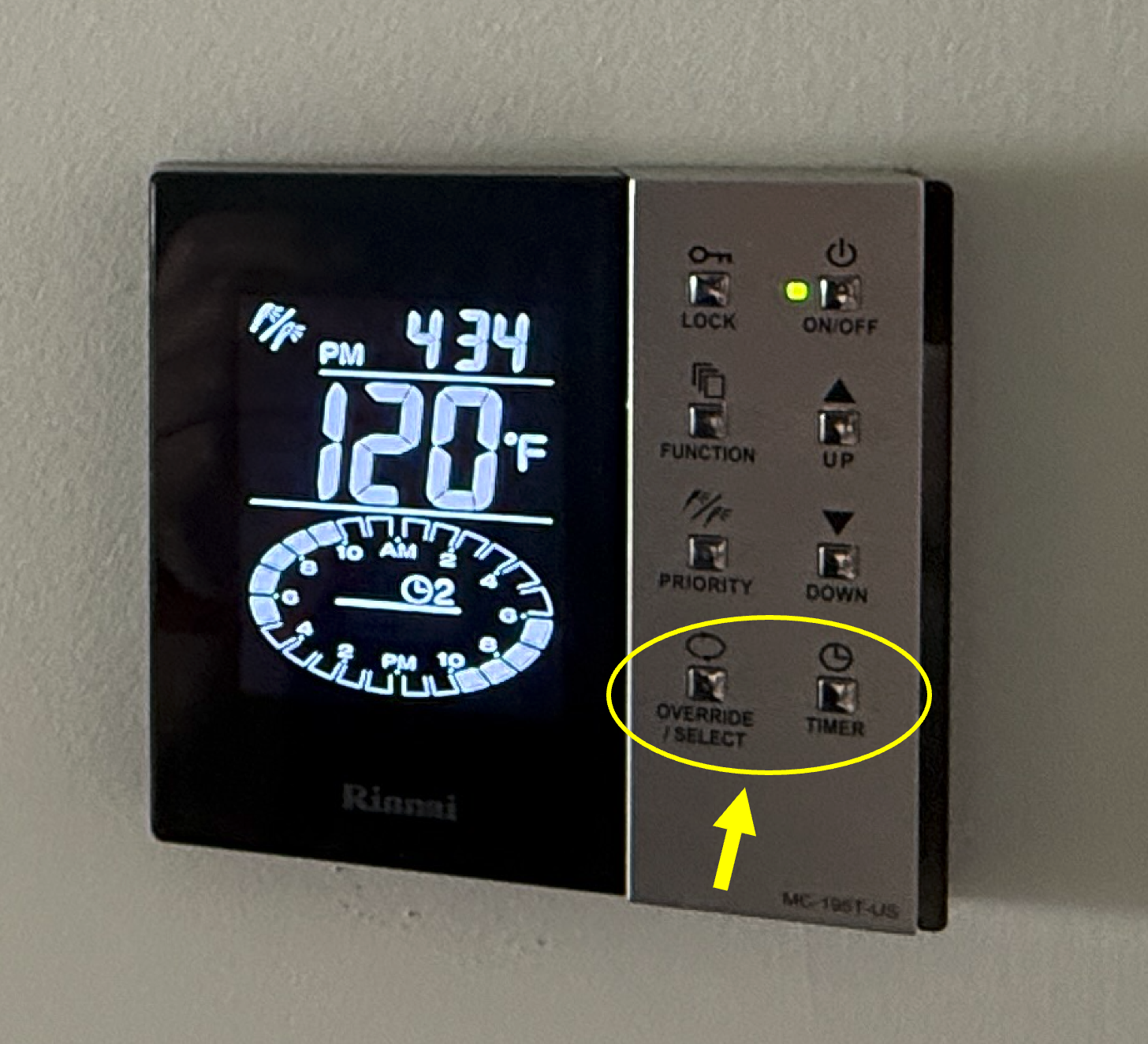
- If the display is off: The system may have been turned off between stays. Press the On/Off button in the top-right corner to turn it on. The screen will display the time and temperature.
- Recirculation Timer (recommended default): Press the Timer button to enable scheduled recirculation. The system is preset to run 6:00–10:00 AM and 5:00–10:00 PM for faster hot water during peak times. The display shows a clock icon when the timer is active. This is the most energy-efficient option.
- Instant Recirculation (use sparingly): Press the Override/Select button when you need hot water outside the scheduled hours. This runs recirculation continuously until you press it again, which keeps the pump running and uses more energy. Press Override/Select a second time to turn it off when you're done.
- Temperature: The water heater is set to 120°F for safety. Please leave this setting alone.
- Locked controls: If the controls appear locked (no response to button presses), press and hold the Lock button for 3 seconds to unlock.
Pool & Spa
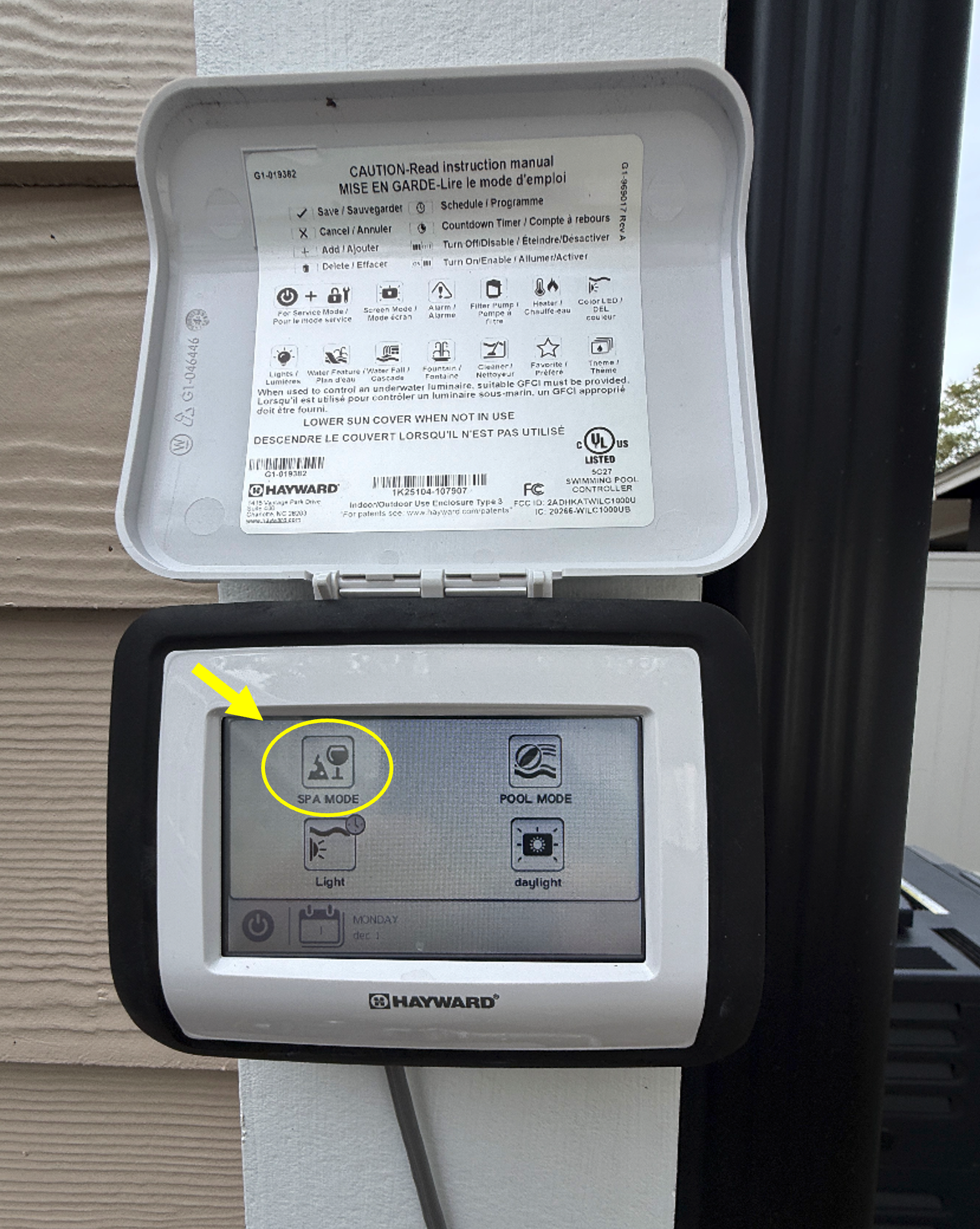
An OmniLogic touchscreen is mounted on the outside corner of the home, just off the stairs up to the main deck. Stepping stones lead to it.
Operating the System
The system is already programmed. Guests should only use three buttons: Pool Mode, Spa Mode, and Lights.
- Pool Mode: For normal swimming and circulation.
- Spa Mode: Press SPA MODE once and give the system a few minutes to respond. You'll know it's working when the spillover begins to slow down and the jets inside the hot tub kick on. The spa heats to about 100°F, which can take up to 30 minutes depending on weather. Spa Mode runs for 2 hours, then automatically returns to Pool Mode. To get another 2 hours, wait until the first 2 hours are almost up and then press SPA MODE again. The button does not toggle or accumulate time; each press simply runs Spa Mode for 2 hours from that moment.
- Return to Pool Mode: Touch the Pool Mode button anytime to switch back from Spa Mode.
- Lights: Pool and spa lights turn on at sunset and off around 10 PM automatically. You can also control them manually using the Lights button on the touchscreen.
- Spillover: Pre-scheduled from roughly 10 AM to 10 PM. No adjustment needed.
What NOT to Do
DO NOT change settings, open menus, or adjust valves or equipment. Everything is automated and professionally managed. The pool equipment camera covers only the equipment area; it does NOT monitor the pool, spa, or backyard.
Pool Heating
The pool itself is NOT heated by default. Seasonal heating is available when outdoor temperatures are above approximately 55°F for an additional fee. The pool will be heated during the daytime schedule to approximately 82°F. If you're interested, request heating at least 48 hours before your check-in date.
Professional Maintenance
Professional pool maintenance typically occurs Friday afternoons, and Monday and Friday afternoons during peak season, weather permitting. The pool care team is professional and discreet, performing routine cleaning, water testing, and equipment checks.
Safety Rules
- Swim at your own risk.
- Children: Must be supervised by an adult at all times. No swimming alone.
- Safety: No running, jumping, diving, or rough play. No jumping off the spa wall or pool sides.
- Glassware: No glass containers. Use plastic or metal only.
- Quiet hours: 10 PM - 7 AM.
- Before use: Shower before entering the pool or spa.
- Water quality: No lotions, oils, or sand in the water.
- Gate security: Keep backyard gates closed and latched at all times.
Amenities
Lighting
Salty Oak OKI features advanced Lutron dimmers and switches throughout the home for ambiance and comfort.
- On/Off: Tap the middle of the paddle once to turn lights on or off.
- Adjusting brightness: Press the small top button on the side of the paddle to brighten, or the small bottom button to dim.
- Full brightness: Double-tap the paddle for instant 100% brightness.
- Fade to off: Press and hold the main paddle bottom for a smooth 10-second fade-out (great for bedtime).
- Exterior lights (Auto): Follow an astronomical clock, turning on at dusk and off at 11 PM automatically.
- Auto timers: Bathroom fans, closet lights, and some utility lights have built-in timers that turn off automatically after a short period. This is normal and saves energy.
Ceiling Fans
Ceiling fans are installed in the bedrooms, bunk room, and several common areas. Controls vary by location.
Four King Bedrooms and Their En-Suite Bathrooms
The Lutron wall switch labeled "Fan" must be turned on. A green LED on the switch indicates the power is on. Fan speed is then controlled using the local remote control kept in each room.
Bunk Room, Family Room, Front Porch, Rear Covered Porch, and Walkout Patio
These fans are controlled by a Lutron fan-speed switch next to the light switch on the wall. Four fan speeds plus off are selected directly at the wall switch. No remote needed.
Heating & Cooling
Each level of the home has its own Ecobee touchscreen thermostat in the hallway for independent temperature control.
- View temperature: The current room temperature displays in large numbers on the screen.
- Select mode: Use the mode button to choose HEAT (flame icon), COOL (snowflake icon), AUTO (automatic), or OFF.
- Set desired temperature: Use the up/down arrows to adjust your target temperature.
- Set duration: After adjusting temperature, tap Hold or Hold Until to choose how long the setting will apply, then confirm.
- Suggested settings: Heating 70-72°F, Cooling 76-78°F for comfort and efficiency.
- Important: Keep all windows and exterior doors fully closed for optimal efficiency.
Elevator
The home features an elevator for accessibility and moving luggage or supplies. The elevator is not a toy. Children must never use it without an adult present.
Important Operating Notes
- Speed: The elevator runs slowly for safety. Be patient during operation.
- Door closure requirement: All main doors on every level AND the interior accordion door must be fully closed, or the elevator will not move.
- Safety override: A red STOP button turns off the elevator. Some guests use this as a child safety feature.
- Lighting: Interior lights automatically turn on when you press a floor button and automatically turn off after a time.
- Control equipment: Located in the locked owner's garage. Do not access.
- IN A FIRE, DO NOT USE THE ELEVATOR. USE THE STAIRS AND CALL 911.
How to Use the Elevator
- Press CALL on your current floor. You'll hear the lock unlatch and the CALL light will go off. You have approximately 30 seconds to open the main door. If it relocks, press CALL again.
- Enter the cab and close the main door firmly. Then slide the accordion door fully closed.
- Select your destination floor. The elevator runs slowly. If you open the accordion door while it's moving, the elevator will stop until you close the gate again.
- When the elevator stops and the lock releases, open the accordion door first, then the main door. If the lock resets, press the floor button again to unlock.
- Always close both doors after exiting, or the elevator cannot be called from another floor.
Emergency Phone
An emergency phone is inside the elevator cab. Press the red ON/OFF button for a dial tone and call 911 ONLY in a true emergency. Press the red ON/OFF button again to end the call.
Additional Elevator Help
- Routine help: Message your host through the booking platform.
- Emergencies: Call 911.
- Equipment emergencies (rare): If the host hasn't responded and there's a significant issue, contact Home Elevators and Lift Products at 843-353-3533.
Entertainment
Roku TVs (Living Room & Bedrooms)
All Roku TVs are in Guest Mode, allowing you to sign into your own streaming services with your credentials. Services will automatically log out on your checkout date.
- First step: Power on the TV (circle icon in the top left of the remote) and set your checkout date when prompted.
- Adding apps: Scroll to APPS on the home screen, search for the service you want (Netflix, Hulu, YouTube TV, etc.), select it, press OK to install, and sign in with your credentials. You'll need to add your streaming apps inside the Roku.
- Remote batteries: If the red LED blinks or the remote doesn't respond, plug it into the USB-C cable provided for a couple of hours. (Note: The bunkroom TV uses AAA batteries. Spare batteries and a screwdriver are available in the kitchen pantry.)
- Volume: Use the buttons on the right side of the remote.
- Remote storage: Bedroom remotes are on the dresser or near the TV; the living room remote is on the table below the screen or on the coffee table centered in the room.
Back Porch SunBrite TV
A 75" outdoor SunBrite TV is mounted on the screened porch. It has its own remote and requires AAA batteries. A Phillips screwdriver is needed to open the battery compartment. Spare batteries and a screwdriver are in the kitchen pantry. Please sign out of streaming apps before you leave and ensure the TV is powered off.
Outdoors
Grill
A stainless steel Weber gas grill is connected to a dedicated propane gas line (no tanks to swap, so you'll never run out of gas during your stay).
Operating the Grill
- Main shutoff valve: Located directly behind the grill. Leave it ON during normal use. Turn it OFF only for a gas leak or emergency.
- Lighting the grill: Open the lid, turn the left burner knob to "High/Start," and press the built-in igniter until the burner lights. Turn on additional burners as needed. If no ignition occurs within a few seconds, turn all knobs OFF, wait a few minutes for gas to dissipate, and try again. Do NOT lean over the grill while lighting.
- Turning off: Turn ALL burner knobs to OFF and double-check that flames are completely out (critical for safety to prevent gas buildup). Once the grill is fully cool, close the lid and gently replace the grill cover.
Care & Maintenance
- Tools: BBQ utensils and a meat thermometer are in the kitchen. Return them clean after use.
- After grilling: Once the grates cool slightly, brush off food residue and wipe up major spills. Excessive grease or food buildup may result in additional cleaning charges.
- Safety: A fire extinguisher is mounted just inside the screened-in porch door.
- Do NOT: Move the grill, modify gas connections, or use additional fuel sources.
- Important: PLEASE TURN OFF ALL BURNERS AFTER USE.
Fire Pit
A Solo Stove fire pit is available for firewood burning only.
Building & Using the Fire
- Remove the stainless steel lid and arrange kindling and fire starters in the center.
- Light the kindling and gradually add small pieces of wood.
- Once established, add larger logs, keeping all wood below the top air holes for optimal airflow.
- Firewood, kindling, and fire starters are NOT supplied. Purchase them at local grocery stores. A lighter can usually be found in the kitchen.
Safety & Cleanup
- Supervision: Always supervise the fire. Keep children at a safe distance.
- Extinguishing: Let the fire burn down and cool completely. Do NOT dump water inside unless necessary for safety.
- After use: Once extinguished and cool, replace the stainless steel cover on top of the Solo Stove.
Outdoor Seating & Cushions
Screened-in Porch
Seating is kept covered to minimize dust and pollen. Remove the cover and place it in a secure location when using. Replace the cover after use, or before bad weather is forecast.
Front Covered Porch
The Polywood chairs on the front porch are designed to be used with their cushions. For the best comfort, grab the cushions from the storage closet off the covered porch (main level) before settling in. Return the cushions to the closet after use, especially before storms. Do not bring damp or wet cushions inside.
Hanging Egg-Shaped Wicker Chairs (Covered Patio)
Two hanging egg-shaped wicker chairs are on the covered patio. They are designed for sitting, lounging, and relaxation only, not as toys or swings. Please do not spin, wind, twist, or swing them in circles. Children must be supervised when using these chairs at all times.
Cushions are stored in the storage closet off the covered porch on the main level. Place them on the chairs when in use and return them to the closet before storms or at checkout. Ensure cushions are completely dry before storing to prevent mildew.
Drying Wet Cushions
If cushions get wet, wipe them dry or stand them upright in the garage to dry. Make sure cushions are completely dry before returning them to storage. Do not bring damp cushions inside.
Beach Gear
Beach gear is stored in the small garage (not the large locked garage). Available items include:
- Beach dolly for transporting items to the sand
- Beach chairs
- Cooler
- Kid's wagon
- Games (cornhole and ring toss)
- Small shop vac for cleanup
Note: Beach umbrellas are NOT provided. Please bring your own if you'd like one.
Important Notes
- Beach towels are not provided. Bring your own or rent locally.
- Treat all gear with care and return items to designated spots when done.
- Golf carts are not included with your rental. Local golf cart rentals are available. If you rent one, park it outside the small garage. The small garage has a charging outlet available. The small garage is for beach gear storage only, not for vehicle parking.
Outdoor Shower & Hoses
We've made it easy to rinse off before coming inside or getting in the pool. Three options are available outside:
- Heated outdoor shower: Located by the pool, with a detachable head for rinsing sand from feet, beach gear, or a full rinse before the pool.
- Front hose: On the driveway next to the small garage door. Convenient for rinsing feet and beach gear when you return from the beach.
- Back hose: On the patio. Convenient for rinsing before entering the pool or coming inside.
We kindly ask that guests rinse sandy feet at one of these stations before entering the home, and rinse off after the beach before getting in the pool. It helps keep the home clean and the pool sand-free for everyone.
House Rules & Safety
Guest Policies
- Maximum occupancy: 11 guests maximum. The primary guest (person who made the booking) must be 25 years or older and stay onsite for the entirety of the reservation.
- Off-limit areas: Owner closets, mechanical closets, and the large locked garage. These areas are not part of your rental.
General Rules
- No parties or events: This is a quiet vacation rental, not a party house.
- No commercial activities: The home is not to be used for filming or other commercial activities.
- No moving furniture: Furniture should be left in its current location.
- Quiet hours: 10 PM - 7 AM. Please keep noise levels low during these times out of respect for neighbors.
Smoking & Vaping Policy
COMPLETELY SMOKE-FREE and VAPE-FREE: This applies inside the home, on porches, decks, and throughout the yard. Smoking and vaping monitoring devices are in place. Evidence of smoking or vaping will result in a smoke remediation and deep cleaning fee, plus repair costs. Ongoing violations will result in early termination of your stay without refund.
Pets Policy
No pets indoors, on porches, or in the yard. Unauthorized pets will result in a deep cleaning fee and potential repair costs. Ongoing violations will result in early termination of your stay without refund.
Breakages & Damages
Accidents happen! If you break or damage something, please let your host Galen know immediately through the booking platform. Minor accidents typically incur no charge. For larger damages (such as a TV screen), we'll agree on a fair cost before you leave.
Emergency Safety Information
What to Do in an Emergency
- For any emergency: Call 911 immediately. State your location as: 108 SE 75th St, Oak Island, NC.
Fire Safety
- DO NOT USE THE ELEVATOR. Use the stairs to exit immediately.
- Ensure everyone is accounted for and out of the home.
- Call 911 once you're safely outside.
Safety Equipment
- Smoke & CO detectors: Throughout the home.
- Fire extinguishers: 3 locations: kitchen (under sink), screened porch (by grill door), small garage (by door to home).
- First aid kit: In the kitchen pantry.
Security & Monitoring
- Security cameras: Five exterior cameras total. Three standalone cameras cover the driveway, pool equipment (north side), and utilities (south side). Two doorbell cameras are at the front. Cameras do NOT monitor the pool, spa, backyard, or the interior of the home.
- Noise monitoring: Decibel monitors are in place to enforce quiet hours (10 PM - 7 AM).
Medical Services
Urgent care, primary care providers, and hospitals are located in the Southport area, approximately 15-30 minutes away. Pharmacies are available on Oak Island and in Southport. Use your phone's map app to find current locations and hours.
Weather & Beach
Local Weather
Check the local weather forecast and conditions for your stay:
- Weather Station: Salty Oak OKI Weather Station
Tide Schedule
Plan your beach activities around tide times:
Beach Conditions & Safety
Check beach flags, conditions, and local rules:
- Beach Flag Warnings: Oak Island Beach Safety
- Beach Rules: Oak Island Beach Rules
Emergency Notifications
Stay informed about critical alerts and weather updates:
- Oak Island Public Alert Signup: Sign up for emergency notifications during your stay.
Explore the Area
Oak Island and the greater Southport area offer excellent dining, entertainment, attractions, outdoor activities, and shopping. Here are some local favorites to explore during your stay:
About a 15-minute walk from the home, right next to Oak Island Pier. Caribbean-inspired dining.
Ice cream and donuts
Health-focused breakfast and cafe
Ice cream and sweet treats
Fresh seafood and cocktails
Southern comfort cuisine
Premium seafood and steaks
Thai cuisine and wines
Casual island dining
Fresh catch, breakfast & lunch
Italian pizza and pasta
Smoked meats and sides
Casual seafood and sandwiches
Wood-fired pizzas and dishes
Local craft brewery. Reasonable walking distance.
Great oceanfront views. Bar and grill with live music.
Wine bar and craft beer
Sports bar and restaurant
Traditional Irish pub
Waterfront dining and bar
Brewery and restaurant
Easy 15-minute walking distance. Fishing and walking pier.
Tours must be scheduled in advance. Historic lighthouse and museum.
Fishing pier and restaurant
Historic lighthouse on island
Maritime history museum
Historic fort and museum
Historic jail building
Temporarily closed. Check status before visiting. Interactive aquarium experience.
Movie theater
Mini golf and games
Yoga classes
Great for walks and shelling. Beach and nature area.
Nature trails and programs
Park and beach access
Green space and recreation
Riverfront park and trails
Ferry accessible island
Beach and historic site
Full-service grocery
Grocery shopping
Convenience store
General merchandise
Departure
Check-Out
Check-out time is 10:00 AM. Please be ready to depart by this time.
Final Steps
To ensure a smooth checkout, please complete this simple checklist:
- Load and start the dishwasher
- Take all trash to the outdoor bins
- Return any used items to their original locations
- Close all doors and windows
That's all! No need to strip beds, sort towels, or start laundry. We'll take care of the rest.
Final Words
Thank you for choosing Salty Oak OKI for your vacation! We hope you've had a wonderful stay and created lasting memories with family and friends on beautiful Oak Island. We can't wait to welcome you back!
Leave a Review
We'd love to hear about your stay! Online reviews help future guests discover Salty Oak OKI and provide valuable feedback to help us improve.
If you had an experience that's less than 5 stars, please reach out to your host Galen directly through your booking platform first. We'd love the opportunity to make things right and address any concerns before you post a review.